Lesson 10 of 12 · Advanced
How to retopologize a 3D model automatically
Retopology rebuilds a mesh with a clean, even layout of faces. Scans, sculpts and AI models come out as dense, messy triangles that are hard to animate, unwrap or edit. Clean quads fix that.
Doing it by hand takes hours. This guide uses AI Retopology, which does it automatically in one pass.
What you need
- A GLB, OBJ, FBX, STL or PLY file (any size: models over 200,000 triangles are reduced in your browser first)
1Upload your model
Drop the file on AI Retopology.
2Pick a face count and type
Choose how many faces the new mesh should have, and Quads (for animation and sculpting) or Triangles (for game engines).
Turn on Keep sharp edges for hard-surface models such as props and machines; leave it off for organic shapes.
3Compare and download
Check the before and after wireframes side by side, then download the OBJ. Quads stay quads in the OBJ, and Blender imports it as it is.
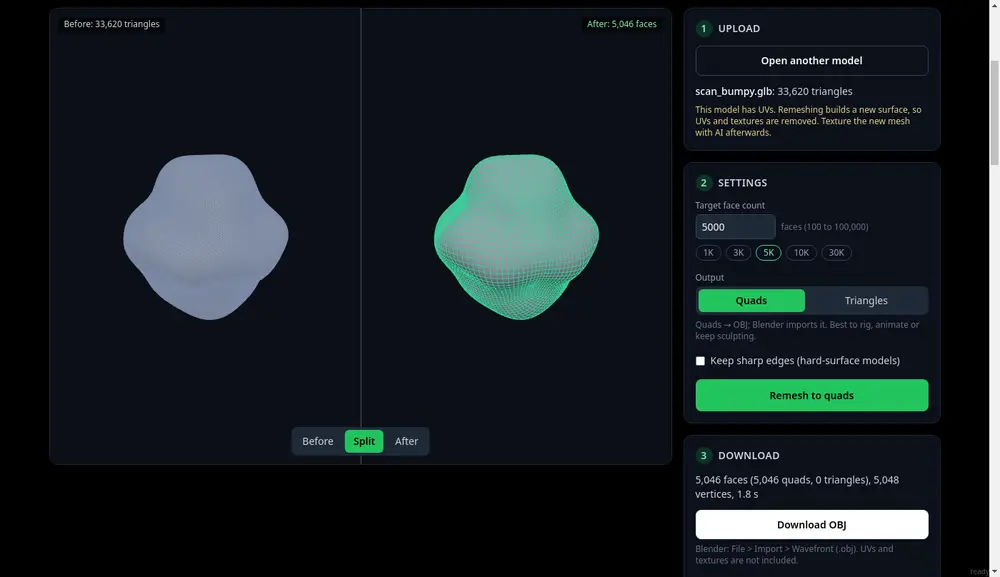
Before and after, side by side.
Tips
- Retopology rebuilds the faces, so the old UV map and texture do not carry over. Re-texture the clean model with Texture Transfer or AI texturing.
- Only need a smaller file for printing? Reducing the STL is simpler.
Try it now
It is free and runs in your browser.
Open AI Retopology