Lesson 11 of 12 · Advanced
How to make a collision mesh for a game
Game engines do not use your detailed model for physics. They use a simple stand-in shape, the collision mesh. A good one is light, close to the model and convex, or made of a few convex parts.
This guide uses the free Collision Mesh Generator. The model is read in your browser; nothing is uploaded.
What you need
- A .glb, .gltf, .fbx, .obj or .stl model, or the sample chair
1Drop your model
Drag the file onto the generator, or try the sample chair.
2Pick a collider
One convex hull is the cheapest and fine for simple, rounded objects. A compound of hulls (one per mesh, or 2 to 32 clusters) follows shapes with gaps, like a chair or an arch.
A box, sphere or capsule for the whole model or each part is the fastest for physics. Set the triangle limit per hull.
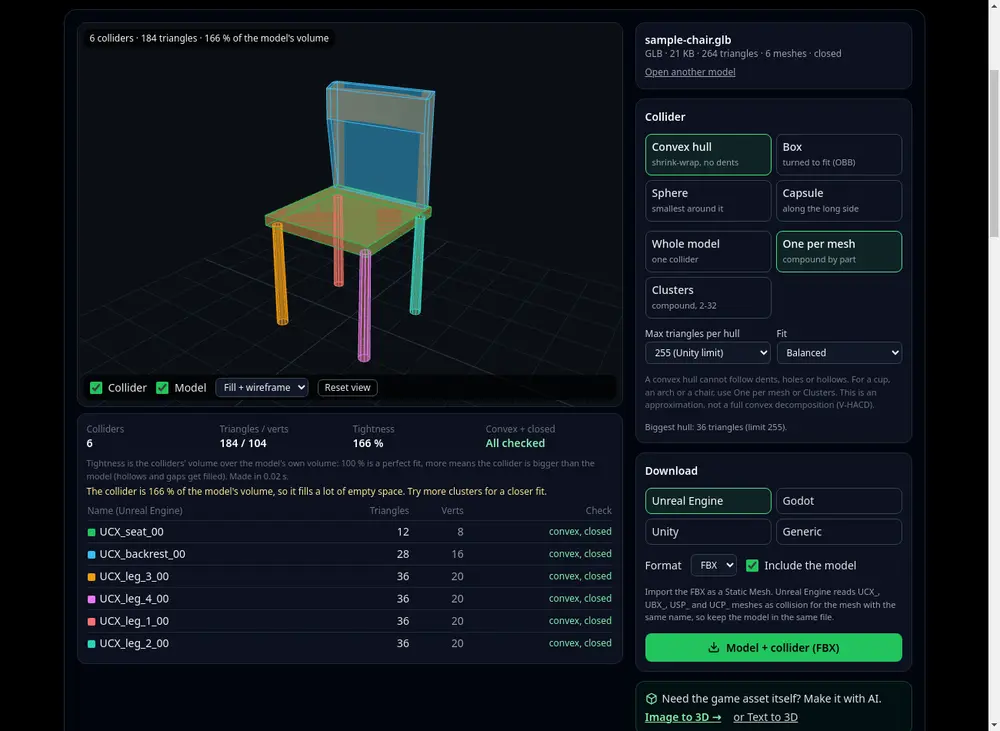
A compound collider: one coloured hull per part. 3Check the fit
The colliders are drawn over the model in colour. Turn the fill and the wireframe on and off, and read the hull count, triangles and tightness.
4Download for your engine
Choose Unreal Engine, Godot, Unity or generic names, the format (GLB, OBJ or FBX), and the colliders alone or with the model in one file.
Unreal picks up UCX_ meshes on import; Godot reads its -colonly style names; in Unity, add a Mesh Collider with Convex ticked to each hull.
Tips
- Fewer hulls and fewer triangles mean faster physics. Start with a box or one hull and add parts only where objects must pass through gaps.
- Heavy source model? Retopologize or reduce it first for a faster, cleaner fit.
Try it now
It is free and runs in your browser.
Open the collision mesh generator