Lesson 2 of 12 · Beginner
How to convert STL to OBJ for free
STL is made for 3D printers. Animation, game and texturing apps often want OBJ instead. Converting is quick and the shape stays exactly the same.
This guide uses the free STL to OBJ converter, which runs on your own device.
What you need
- An .stl file up to 100 MB
1Add your STL
Open the converter and drop your file on Drop a .stl file here or click to choose.
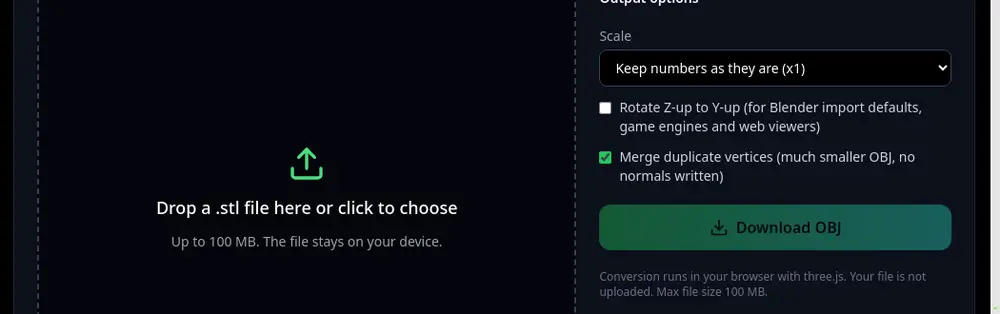
The converter and its output options. 2Pick the output options
Leave Merge duplicate vertices on. STL repeats every corner for each triangle; merging joins them, which makes the OBJ much smaller and gives you a connected mesh you can edit.
Tick Rotate Z-up to Y-up only if the model shows up lying on its back in your app. Game engines and web viewers use Y-up; CAD and slicers use Z-up. Blender handles both.
Under Scale, keep the numbers as they are, or scale millimetres to centimetres or metres if your scene uses them.
3Download the OBJ
Press Download OBJ and import the file into Blender, Maya, Unity, Unreal or any app that reads OBJ.
STL has no colour, textures or UVs, so the OBJ has none either. To add colour, see how to texture a 3D model with AI.
Tips
- Going the other way? Use OBJ to STL. For games, STL to GLB gives one compact file.
- An OBJ is text, so it can be bigger than a binary STL with the same mesh. That is normal.
Try it now
It is free and runs in your browser.
Open the STL to OBJ converter